
Megapixels in Security Cameras: What’s the Real Difference Between 2MP, 4MP, 6MP and 8MP?
Megapixels aren’t everything. See the real difference between 2MP, 4MP, 6MP and 8MP cameras — and which one suits your site.
When people compare security cameras, the first thing they often look at is megapixels (MP). More megapixels can mean more detail — but only when the camera, lens, lighting and scene are matched correctly.
This guide breaks down what you actually get from 2MP, 4MP, 6MP and 8MP, how they impact identification, storage, and low-light performance, and how the major brands AXIS Communications, Dahua, and Hikvision support each resolution tier.
What a “megapixel” really means (and why it’s not the whole story)
A megapixel is simply one million pixels. More pixels can allow:
More detail on the same scene (better zoom-in after the fact), or
Wider coverage while maintaining usable detail.
But megapixels don’t automatically guarantee better results, because image quality also depends heavily on:
Sensor size and sensitivity (low light)
Lens quality and field of view
Dynamic range (WDR) for backlit scenes
Compression settings and bitrate
Motion blur (shutter settings, lighting)
So think of megapixels as potential detail, not a guaranteed outcome.
Resolution cheat sheet (with real-world camera examples from major brands)
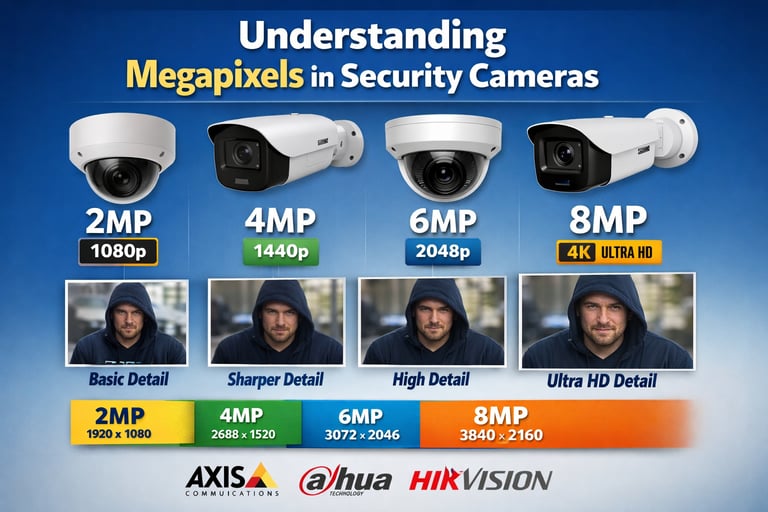
Below are the most common “real” pixel dimensions used in security cameras for each megapixel tier (as shown in manufacturer specs).
TierTypical max resolutionPixels per frame (calculation)What it’s commonly called
2MP 1920 × 10801,920 × 1,080 = 2,073,600 (~2.07MP)1080p / Full HD
4MP2688 × 15202,688 × 1,520 = 4,085,760 (~4.09MP)“4MP”
6MP3072 × 20483,072 × 2,048 = 6,291,456 (~6.29MP)“6MP”
8MP3840 × 21603,840 × 2,160 = 8,294,400 (~8.29MP)4K / UHD
Proof these are common in real products:
2MP (1920×1080): AXIS M3085-V max video resolution 1920×1080 ; Dahua IPC-HFW2241T-ZS outputs 2MP (1920×1080) ; Hikvision DS-2CD2123G0-I(S) max resolution 1920×1080
4MP (2688×1520): AXIS M3106-LVE Mk II max video resolution 2688×1520 ; Dahua IPC-HFW2449T-AS-IL outputs 4MP (2688×1520) ; Hikvision DS-2CD2345G0P-I max resolution 2688×1520
6MP (3072×2048): AXIS M3067-P datasheet lists 6MP (3072×2048) ; Dahua DH-IPC-HDW3666EMP-S-AUS outputs 6MP (3072×2048) ; Hikvision DS-2CD2365G1-I max resolution 3072×2048
8MP / 4K (3840×2160): AXIS P1388 highlights 8MP / 4K ; Dahua IPC-HDW3849H-AS-PV-ANZ-S2 outputs 8MP (3840×2160) ; Hikvision DS-2CD2386G2-I(U) max resolution 3840×2160
2MP (1080p): the “workhorse” for general coverage
Best for:
Lobbies, hallways, small offices
Situations where you’ll mount the camera closer to the subject
Projects prioritising low storage and stable streaming
Pros
Lower bandwidth + storage compared with higher MP
Often strong low-light performance when paired with a good sensor/lens
Great value and easy to deploy at scale
Cons
Less ability to digitally zoom in and still retain detail
Wide-angle scenes may not deliver enough detail at a distance
Brand examples
AXIS offers many 2MP models (e.g., AXIS M3085-V is 1920×1080).
Dahua WizSense 2MP models commonly output 1920×1080.
Hikvision Pro-series 2MP cameras list 1920×1080 max resolution.
4MP: the “sweet spot” for sharper detail without going full 4K
Best for:
Strata common areas, car parks, and loading docks
Retail floors where you want extra facial/incident detail
Wider scenes where 2MP starts to look soft when zoomed
Pros
Noticeably more detail than 2MP for the same view
Often a strong balance of cost, storage, and clarity
Cons
More storage and bandwidth than 2MP
If you push very wide angles, you can still run into pixel-density limits
Brand examples
AXIS M3106-LVE Mk II lists 2688×1520 max video resolution.
Dahua IPC-HFW2449T-AS-IL lists 4MP (2688×1520).
Hikvision DS-2CD2345G0P-I lists 2688×1520 max resolution.
6MP: where detail starts to become “investigation-friendly”
Best for:
Larger areas where you still need identifiable detail
Sites that want clearer images for incident review (without the full overhead of 8MP)
Multi-use scenes (people + vehicles) where you may need to crop in
Pros
Strong step-up for zooming/cropping footage
Useful when you can’t mount closer but still need detail
Cons
Higher bandwidth/storage
Can require better lighting and a correct lens choice to avoid motion blur
Brand examples
AXIS supports 6MP in various cameras (e.g., AXIS M3067-P is 3072×2048).
Dahua 6MP WizSense models commonly output 3072×2048.
Hikvision 6MP models list 3072×2048 max resolution.
8MP (4K): maximum detail — when you can support the bandwidth and lighting
Best for:
Large open areas: car parks, warehouses, perimeter lines
Scenarios where you expect to zoom in during investigations
When you want to cover a wider scene without sacrificing as much detail
Pros
Highest ability to crop in and still keep detail
Great for scenes where subjects may be further from the camera
Cons
Significantly higher storage and bandwidth requirements
Needs good lighting and correct settings to avoid blur/noise
Poor design choices (wrong lens/placement) can waste the extra pixels
Brand examples
AXIS P1388 promotes 8MP with “excellent image quality in 4K”.
Dahua 8MP models list 3840×2160 output.
Hikvision 8MP AcuSense turret shows max resolution 3840×2160.
The biggest mistake: choosing megapixels before you choose the outcome
The right question isn’t “How many megapixels?” — it’s:
What do you need the footage to do?
Detect: Is someone there?
Observe: What are they doing?
Recognise: Is it the same person you’ve seen before?
Identify: Can you clearly identify them?
These are commonly referred to as DORI, and manufacturers like AXIS publish planning guidance that ties required detail to pixel density and operational outcomes. Also worth noting: AXIS has discussed how the IEC 62676-4 standard is evolving beyond the familiar DORI framework (with updates described in late 2025), reinforcing that performance planning is more than just “MP”.
Practical recommendations (simple, real-world)
Choose 2MP when cameras are close to the subject and you want efficient storage (corridors, small rooms, entrances).
Choose 4MP for the best all-round balance in most strata/commercial jobs.
Choose 6MP when you need better zoom-in detail across mid-to-large scenes.
Choose 8MP (4K) when the scene is big and you’re prepared to design around bandwidth, lighting, lens choice, and recording capacity.

Advance Digital Systems 2025



Master Security License: 000110785